How Can I Text Someone From a Computer?
Updated Sep 14th, 2026 - 6 min read
 One-Time Fax
Rated 5 stars on

Google Reviews
Picture a front desk employee trying to send appointment reminders to twenty patients before lunch, one thumb-typed text at a time on their phone. It works, but it is slow, and every message pulls their attention away from the people standing in front of them.
Moving that work to a computer solves the speed problem, but it raises a new question: what is the best way to actually do it? Whether you are looking up how do you text message from a computer or comparing options for your team, this guide covers how to send a text from a computer, the main methods available, and how a platform like Notifyre supports business texting at scale.
Texting from a computer means sending an SMS message through your desktop or laptop instead of typing directly on a phone. There are three common ways to do this:
Phone pairing apps. Tools like Google Messages for Web or Windows Phone Link mirror your phone's messages onto your computer screen.
Email to text. You send an email to a special address, and it arrives as a text message.
A business SMS platform. You send from a web dashboard, email integration, or an SMS API, using a dedicated business number.
Each option works differently, and the right one depends on whether you are sending as an individual or as a team.
Computer messaging refers to using a desktop or laptop to manage text-based communication instead of relying on a mobile phone. For businesses, this can include sending SMS, managing customer replies, scheduling messages, and giving multiple team members access to conversations through an online messaging platform.
A desktop text message is an SMS sent from a computer rather than typed on a mobile phone. With Notifyre, you can send one through the web app, Email to Text, or an SMS API, with the message delivered to the recipient's mobile phone as a standard text.
Phone pairing is fine for texting a friend. Business texting is different:
Multiple staff need access to the same conversations, not just one person's phone.
Messages need to be tracked, so a team knows what was sent and delivered.
Typing speed matters when you are sending dozens of messages a day.
Business texts perform well as a channel. SMS statistics on open rates show text messages are read within minutes, with open rates as high as 98 percent.
That performance is why businesses use text messages for appointment reminders, order updates, and two-way customer support, not just casual conversation.
Here is what the process looks like using Notifyre as an example.
Step 1: Create your account and verify your business. Sign up and add your business details. Notifyre verifies this information before you can send at scale.
Step 2: Choose how you want to send. You can send from the web dashboard, use Email to Text to send messages straight from your inbox, or connect the SMS API if you want texting built into your own software.
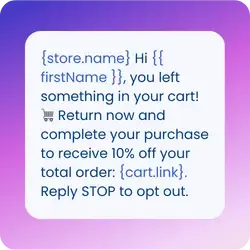
Step 3: Add your contacts and write your message. Upload a contact list or add numbers manually, then write your message. SMS templates let you reuse wording for common situations instead of retyping it each time. A useful template stays under 160 characters where possible, since longer messages split into multiple parts and each part is billed separately.
Step 4: Send and track delivery. Once you send, delivery reporting shows whether each message was delivered, so you are not guessing whether a customer received it.
If you prefer to send SMS directly from your existing email inbox, Notifyre's Email to Text feature works with Gmail, Outlook, Yahoo, and other major email clients.
Sign up for Notifyre and add your email address as an Authorised Sender under SMS Settings.
Open your email and compose a new message.
Enter the recipient's mobile number in the To field, including the country code, followed by @{accountid}.sms.notifyre.com. For example: 61487799888@61FKQ4A1.sms.notifyre.com.
Write your text in the email body. Avoid images, footers, and HTML formatting.
Click Send. Notifyre converts the email into an SMS and delivers it to the recipient's mobile number.
The email subject is optional and will not appear in the SMS.
Notifyre is a secure online SMS, MMS, and fax platform built for this kind of business texting. Here is what that means in practice:
No more juggling one phone between staff. The web dashboard lets multiple team members send and reply from the same business number.
No retyping the same message. Message templates store common wording so staff can send in seconds, not minutes.
No guessing if a text arrived. Delivery reporting confirms whether each message was delivered, not just sent.
No missed replies. Two-way SMS puts customer responses into one shared inbox instead of a personal phone.
No manual timing of scheduled SMS. SMS scheduling queues messages for a specific date and time in advance.
No need to open the dashboard for every message. Email to Text sends messages straight from your existing inbox.
No compliance guesswork. Notifyre's infrastructure is ISO 27001 certified.
Notifyre does not allow you to send a text message online for free. Free text messaging platforms comes with real tradeoffs, though:
No delivery confirmation. You have no way to know if the message actually reached the recipient or silently failed.
No guaranteed availability. Carriers can change or block these gateway addresses without warning, since they are not an official messaging channel.
Fine for a one-off text, risky for business. A missed appointment reminder or a delayed order update can cost more in lost trust than a paid platform would ever charge.
Data privacy concerns. Some free messaging services may collect, share, or pass user data to third parties, so always check how your information and message data are handled before using one.
For a single occasional text, phone pairing could be enough. The moment multiple staff need to send from one number, track whether messages were delivered, and follow carrier consent rules like TCPA, personal tools stop being built for the job. That is the specific gap a dedicated platform like Notifyre fills, since it combines the sending method with tracking, templates, and compliance support in one place.
Send and receive business text messages from your computer with Notifyre.


Get unbeatable value with Notifyre’s pay-as-you-go SMS. Send smarter, save more!
 Online SMS Service

Our SMS and fax gateway is compliant with privacy laws, ensuring your business data stays secure. Notifyre’s secure messaging tools keeps your online fax secure and SMS data protected at all times.
 4.7/5
4.7/5