How to Send a Text to Multiple People: SMS Broadcast Guide
Updated Sep 14th, 2026 - 4 min read
 One-Time Fax
Rated 5 stars on

Google Reviews
Sending a quick text to one customer is easy. Sending the same message to hundreds or thousands of customers at once is a different problem entirely. If you have ever wondered how to send a text message to multiple people without copying and pasting the same message over and over, this guide walks through how Notifyre’s SMS service makes it easy.
SMS broadcasting is the process of sending one text message to a large group of recipients at the same time. Instead of sending messages one by one, businesses use a platform to upload a contact list and send the message to everyone on that list in a single action.
This is different from using a personal phone to send a group text message. Business SMS broadcasting sends each message individually, so recipients only see the message from your business.
SMS statistics show that texting has a much higher open rate than email, and most people read a text within minutes of receiving it. For businesses, that makes SMS one of the most direct ways to reach customers with time-sensitive information.
Common reasons businesses send multiple text messages at once include:
Promotional SMS offers and sales announcements
Appointment reminders across a full schedule
Service outage or SMS notifications
Event invitations and RSVPs
Order and shipping updates
Emergency SMS alerts to staff or customers
Trying to do this manually, one text at a time, is not realistic once a contact list grows beyond a handful of people. A dedicated SMS platform can speed up the process siginificantly with the use of contact lists, SMS templates and SMS personalisation.
There are a few different methods businesses use to send text messages to multiple people, and each comes with trade-offs. As your contact list grows, an SMS broadcast platform can help you manage business messaging at scale.
| Method | How it Works | Limitations |
|---|---|---|
| Manual texting | Sending individual texts from a personal phone | Slow, no tracking, easy to make mistakes |
| Group Messaging (Standard format on iOS and Android) | Adding multiple contacts to one message thread | Recipients can see and reply to each other |
| SMS broadcast platform | Uploading a contact list to a business SMS platform | Requires an online SMS service, but offers delivery reports, scheduling, and compliance tools. |
The general process for sending multiple text messages at once through a business platform looks like this:
Build or upload your contact list. Most web based SMS services let you import a spreadsheet of phone numbers or manually add contacts to digital address book. From there you can organise contacts into groups and segment your audience to send targeted, higher converting messages. ontact list can range from a few hundreds numbers to thousands.
Write your message. Keep it clear and include any necessary opt-out instructions.
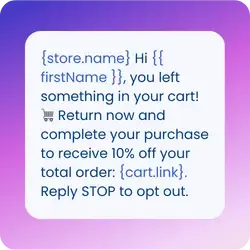
Personalise where needed. Many texting systems allow merge fields, so each recipient's name or appointment time can be inserted automatically.
Choose to send immediately or schedule for later. SMS scheduling is useful for reminders or time-sensitive campaigns.
Send and monitor delivery. SMS delivery reporting shows which messages were sent, delivered, or failed.
Notifyre’s highly rated bulk SMS service allow businesses to upload a contact list and send a single message to thousands of recipients from one dashboard, the SMS API or email to text.
Sending a text to multiple people does not need to mean sending one message at a time. With the right SMS gateway, businesses can reach entire contact lists in seconds while staying on top of consent, opt-outs, and delivery tracking.
Ready to move beyond manual texting? Notifyre's SMS broadcast tools combine bulk SMS messaging with secure account controls, delivery tracking, and ISO 27001 certified infrastructure.
Different industries use bulk texting in different ways:
Retail: Use SMS for retail to send sale alerts and restock notifications to subscriber lists.
Healthcare: Use SMS for healthcare to send appointment reminders
Logistics: Use SMS for logistics to notify customers of delivery windows and delays.
Financial Services: Use SMS for financial services to send banking alerts for account activity or fraud notifications.
Education: Use SMS for education to send schedule changes or emergency alerts to students and parents.
Notifyre's secure online SMS, MMS, and fax platform has been built for businesses and organisations who require the highest standard of data security. For companies that need to send text messages to large groups, Notifyre offers a combination of tools designed to make the process easy:
Bulk SMS for sending to large contact lists in one action
Two-way SMS so customers can reply and your team can respond from the same platform
MMS messaging for sending images or attachments alongside text
SMS API for businesses that want to trigger bulk messages from their own software or CRM
Delivery reporting so you know exactly what was sent and received
SMS scheduling to plan campaigns or reminders in advance
ISO 27001 certified infrastructure and AES-256 encryption to support secure messaging workflows
Sending a text to multiple people does not need to mean sending one message at a time. With the right SMS gateway, businesses can reach entire contact lists in seconds while staying on top of consent, opt-outs, and delivery tracking.
Ready to move beyond manual texting? Notifyre's SMS broadcast tools combine bulk messaging with secure account controls, delivery tracking, and ISO 27001 certified infrastructure.
Reach your entire contact list in seconds with Notifyre's business SMS platform.


Get unbeatable value with Notifyre’s pay-as-you-go SMS. Send smarter, save more!
 Online SMS Service

Our SMS and fax gateway is compliant with privacy laws, ensuring your business data stays secure. Notifyre’s secure messaging tools keeps your online fax secure and SMS data protected at all times.
 4.7/5
4.7/5